MikroMCP brings MCP-based AI control to MikroTik routers
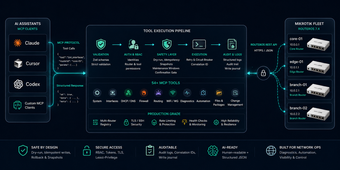
MikroMCP, from AliKarami, is an MCP server that connects AI assistants to MikroTik RouterOS to automate and troubleshoot network infrastructure. The server accepts natural-language commands and translates them into RouterOS actions, providing real-time monitoring, interface and firewall management, and secure credential handling. It implements the Model Context Protocol and requires an MCP-enabled client, making it useful for network administrators, DevOps engineers, and developers who use AI-driven device management in operational workflows.
What is MikroMCP used for?
MikroMCP functions as an MCP-compliant bridge between conversational AI clients and MikroTik RouterOS, turning natural-language prompts into actionable RouterOS operations. The tool supports direct execution of RouterOS commands, on-demand system and hardware monitoring, and AI-mediated management of interfaces and firewall rules. For teams that want conversational control over their routing equipment, the server places the AI-generated command stream at the center of everyday device administration.
How reliable are AI-driven outputs for network configuration?
Reliability depends on the correctness of generated commands because the server applies AI-produced instructions to live devices. Since MikroMCP executes RouterOS commands issued via compatible clients, any mistaken or ambiguous prompt can produce an incorrect action unless the operator validates the output first. Administrators should treat generated changes as operational inputs that require verification and integration with existing change-control procedures.
Does it require technical setup and how is data handled?
Deployment requires a Node.js host and an MCP-enabled client, for example Claude Desktop or Cursor IDE, to act as the conversational front end. The server is described as production-oriented and lightweight, and it includes secure handling of router credentials; however, users must manage their own credentials and network access permissions. That design places responsibility for access control and audit practices with the deploying team.
Good fit for teams that already gate device changes
MikroMCP is a practical option for network teams that pair AI clients with existing operational controls, offering conversational device management without replacing standard change verification. Because the server channels AI output into live infrastructure, enforce confirmation steps, role separation, and audit logging when you introduce it into production. For groups with those processes in place, the server integrates AI-driven tasks into workplace procedures with predictable operational impact.